How to Make Product Videos With AI: A Simple Workflow
This post contains affiliate links; I may earn a commission at no extra cost to you.
AI disclosure: this guide was drafted with help from AI writing tools and reviewed and edited by PickSavvy Lab. Product details come from each vendor's sales page.
You have a product, a few photos and no time to film. AI video tools promise to close that gap, and some of them can. But the tool is the last step, not the first. A weak idea rendered by AI is still a weak idea, just faster.
Here's a workflow that works whether you use an AI app, a free editor with stock footage, or a mix of both. I'll cover one specific tool near the end, with what its sales page says it does and where it falls short.
The short version
- Pick one video type.
- Write a four-line script.
- Decide what to show, and what AI should make vs. what you should film.
- Generate or assemble a first draft.
- Add text for sound-off viewers.
- Label AI content honestly.
- Export in the right shape for each feed.
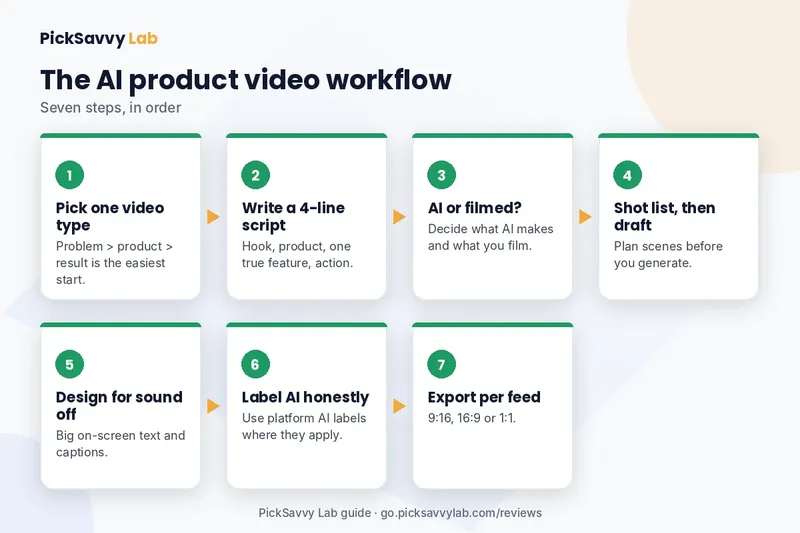
Now the long version.
1. Pick one video type (not three)
Most product videos fall into a handful of formats. Choose one per video:
- Problem → product → result. The classic short ad. Works for almost anything.
- UGC-style talk-to-camera. A person (real or AI) holding or describing the product like a friend would.
- Unboxing / "what's inside." Good for gifts, kits and bundles.
- How-to-use demo. Best when the product needs a moment of explanation.
- Comparison. "Before and after," or "old way vs. this way." Keep it about your product, not someone else's.
If you're unsure, start with problem → product → result. It's the easiest to write and the easiest to judge.
2. Write a four-line script
Short product videos (15 to 30 seconds) rarely need more than four lines:
- Hook (first 2 seconds): name the problem or a surprising detail. "Your coffee's cold by 10am?"
- Product: what it is in plain words. "This mug keeps it hot for hours."
- Proof or feature: one specific, true detail. "Double-walled steel, fits a car cup holder."
- Action: what to do next. "Link below."
Only use claims you can stand behind. "Keeps it hot for hours" needs to be true for your product; if you're not sure, describe the feature (double-walled) instead of the result.
Write three different hooks for the same script. The hook decides whether anyone sees line two, and testing hooks is cheaper than making three videos.
3. Decide what AI makes and what you film
AI is good at some parts of product video and weak at others. A rough guide:
| Part of the video | AI usually handles it well | Better to film or shoot yourself |
|---|---|---|
| Script ideas and variations | ✓ | |
| Voiceover | ✓ | If your own voice is part of your brand |
| A presenter talking about the product | ✓ (AI spokesperson) | If buyers expect a real customer or founder |
| Text overlays, captions, music | ✓ | |
| Close-up of the actual product | ✓ Real photos or footage of your item | |
| Product being used in a specific, physical way | ✓ Hard to fake convincingly, and shouldn't be faked |
The rule underneath that table: the product itself should look like the product. Let AI help with the presentation around it, not invent what the item looks like or does.
4. Build a shot list, then a first draft
For a 20-second video, plan four to six shots:
- Shot 1: Hook visual (the problem, or the presenter's first line).
- Shot 2: Clear product shot from your own photos.
- Shot 3: The feature in close-up.
- Shot 4: Product in context (desk, kitchen, gym bag).
- Shot 5: Presenter or text delivering the call to action.
Then generate or assemble your first draft. Don't polish yet. Watch it once at full speed and ask: does the hook work without sound? Is the product visible within the first few seconds? Is the action clear?
5. Design for sound-off viewing
A lot of feed viewing happens with the sound off. So:
- Burn in captions, or use the app's auto-captions and check them for errors.
- Put the hook as large text on the first frame.
- Keep one idea per text card, five to seven words.
- Keep text in the middle of a vertical frame. The top and bottom are often covered by the app's buttons and captions.
6. Label AI honestly
If your video uses an AI-generated person or voice, be upfront about it. Several major platforms ask creators to disclose realistic AI-generated or altered content, and the settings for this tend to change, so check each platform's current upload options. Beyond the rules, honesty matters for trust: don't present an AI spokesperson as a real customer giving a real testimonial.
7. Export in the right shape
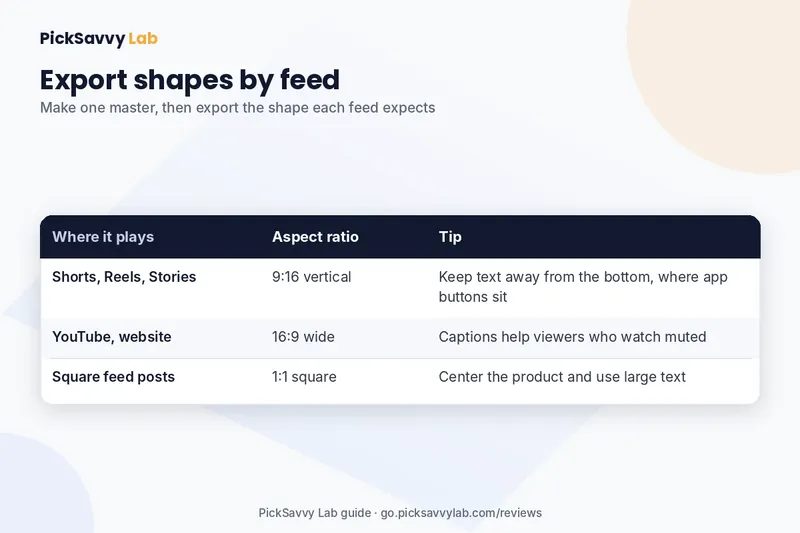
- 9:16 for Shorts, Reels, Stories and similar vertical feeds.
- 1:1 for square feed placements.
- 16:9 for YouTube long-form, websites and product pages.
Make the vertical version first if social is your main channel, then adapt.
Where AIDirectors Premium fits
If steps 2 through 7 sound like a lot of separate tools (a script writer, a voice tool, a presenter, an editor), that's the problem AIDirectors Premium is built around. According to its sales page, it's an AI video app for UGC-style product videos that keeps those steps in one place:
- It writes script options from a product image or link, with an idea generator suggesting 3 to 5 concepts and 3 to 5 script variations per campaign, plus tone and style settings.
- It offers AI spokespersons from a character library, or a custom avatar built from a photo you upload, with automated voiceover and lip-sync, and ElevenLabs voice integration.
- A scene-by-scene storyboard with drag-and-drop editing, real-time preview, text overlays and a background music library.
- Exports in MP4 and MOV, in 9:16, 16:9 and 1:1.
- It also generates video titles, descriptions and ad copy, and the page says no API keys are needed.
That maps fairly directly onto this workflow: script (step 2), presenter and voice (step 3), storyboard (step 4), overlays (step 5) and multi-format export (step 7).
The balanced view
What stands out on the sales page
- One app for script, spokesperson, voice, music and export.
- Custom avatars from your own photo.
- All three main aspect ratios.
- One-time price with a commercial license, and no API keys to set up.
What gives me pause
- Usage limits are stated two ways. The page lists 100 video ad campaigns and 5 active projects, while the FAQ says 5 campaigns a month, with unlimited on an upgrade. Read the terms at checkout and test against them early.
- The guarantee is 14 days, shorter than many tools in this space. Plan to try it on a real product in the first week.
- Upgrades (Professional, Agency, DFY, Unlimited) are offered after checkout.
- The sales page includes earnings talk. I'd judge it strictly as a video tool; I make no income claims for it.
- AI spokespersons are AI-generated people, so see step 6 above.
Who should pass
If you don't have a product or offer to promote yet (the sales page says the same), if you'd rather not use AI presenters in your marketing, or if you need high volume on the base plan, this isn't the right fit. It also won't replace real footage of your product; you still supply the product images.
Pricing
As listed on the sales page when checked Nov 7, 2026: $37 one-time for Premium, shown as reduced from $97, with a commercial license and, per the FAQ, no monthly fee on that plan. Check the current price at checkout, which shows the final amount.
FAQ
How long should an AI product video be? For feeds, 15 to 30 seconds. For a product page, up to about a minute is reasonable if it's a how-to-use demo.
Can AI make a video from just one product photo? Many tools, including the one above according to its sales page, start from a product image or link. You'll still get better results with a few clear photos from different angles.
Do I need to tell viewers an AI presenter isn't real? Several platforms ask you to disclose realistic AI-generated people, and it's the honest thing to do either way. Never present an AI avatar as a real customer.
Will AI product videos look fake? Some will. Using real photos of the product, a natural script and simple edits goes a long way. Review every draft before posting.
What's the best first video to make? Problem → product → result, 20 seconds, vertical, with captions.
Next step
For the full feature list, the usage-limit details and the guarantee in one place, read our AIDirectors Premium breakdown on PickSavvy Lab. You can also browse all our tool breakdowns on the PickSavvy Lab home page.
Whatever you use, start with the four-line script. If those four lines are good, almost any tool will make a decent video from them.
Free: grab our Holiday Content Kit → https://picksavvylabdigitaltools.systeme.io/holiday-kit
Free: Holiday Content Kit (email required, not an affiliate link)
Affiliate disclosure & privacy policy · About · Free Holiday Content Kit