How to Make a Christmas Cartoon Ad for Your Small Business (No Animation Skills)
This post contains affiliate links; I may earn a commission at no extra cost to you.
AI disclosure: this guide was drafted with help from AI writing tools and reviewed and edited by PickSavvy Lab. Product details come from each vendor's official pages.
A Christmas cartoon ad for a small business doesn't need a studio, a mascot designer or a big budget. It needs one clear offer, a short script, four to six simple scenes and the right size for each platform. You don't have to film in a busy shop or find actors.
This guide gives you copy-and-edit script templates, scene ideas for different kinds of businesses, a size and length cheat sheet per platform, and a posting calendar for November and December 2026. The steps work with any cartoon tool. Where we mention RocketToons, the details come from its official sales page (checked Nov 7, 2026). We haven't run our own tests of it, so nothing here is a performance claim.
Step 1: Pick one offer and one goal
The most common mistake in holiday ads is trying to say everything. Before you write a word, fill in this line:
"This ad tells [who] that [one offer] is available [until when], and asks them to [one action]."
Examples:
- "This ad tells local parents that our bakery takes Christmas cake orders until Dec 18, and asks them to order online."
- "This ad tells past customers that gift cards are available any time, and asks them to buy one at the counter or on our site."
If you have three offers, make three short ads, not one long one. Keep the offer true and specific: real dates, real prices, real stock. Don't invent a countdown or a "was" price you never charged.
Step 2: Use a script template
The 15-second template (Shorts, Reels, Stories)
| Scene | Seconds | What happens | Example line (gift shop) |
|---|---|---|---|
| 1. Hook | 0–3 | A quick, funny holiday problem | "Two days to Christmas and still no gift for Dad?" |
| 2. Offer | 3–9 | Your character shows the solution | "Our gift boxes are wrapped and ready in five minutes." |
| 3. Action | 9–15 | Where and when to get it | "Open until 8 pm. 14 King Street." |
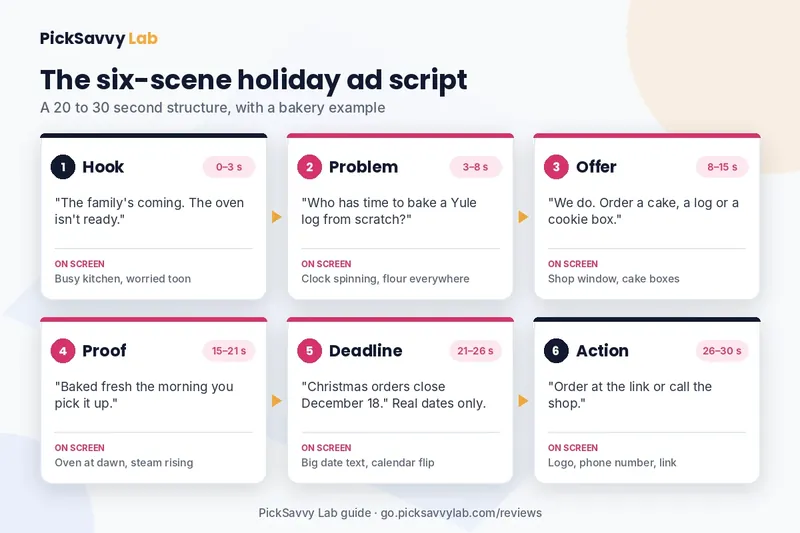
The 30-second template (Facebook, YouTube, website)
| Scene | Seconds | What happens | Example line (bakery) |
|---|---|---|---|
| 1. Hook | 0–3 | A relatable holiday moment | "The family's coming. The oven isn't ready." |
| 2. Problem | 3–8 | Show the stress | "Who has time to bake a Yule log from scratch?" |
| 3. Offer | 8–15 | Your product saves the day | "We do. Order a cake, a log or a cookie box." |
| 4. Proof | 15–21 | One true detail | "Baked fresh the morning you pick it up." |
| 5. Deadline | 21–26 | A real cut-off date | "Christmas orders close December 18." |
| 6. Action | 26–30 | One clear next step | "Order at the link or call the shop." |
Fill-in version you can copy
- Hook: "[Holiday problem your customer has]?"
- Problem: "[Why it's stressful or annoying]."
- Offer: "[Your product or service] [does what]."
- Proof: "[One true, specific fact: fresh daily, local, 10 years in town]."
- Deadline: "[Real date, last order day or opening hours]."
- Action: "[Visit, call, order, book] at [place or link]."
Read it aloud with a timer. If it runs over, cut words from the problem scene first. Spoken lines of about 2 to 3 words per second are easy to follow.
Step 3: Choose scenes and a character
Cartoon ads work best with one main character who appears in every scene. That might be you as a toon, a friendly staff member, a customer type ("the busy parent") or a simple mascot such as a gingerbread baker or a reindeer delivery driver.
Scene ideas by business type
- Bakery or café: a character carrying a tower of cake boxes through snow; a mug of cocoa steaming in the window; a "last orders" sign flipping over.
- Salon or barber: a character getting ready for the office party; a before-and-after mirror moment; a gift card wrapped with a bow.
- Plumber, electrician or HVAC: a frozen pipe or broken heater on Christmas Eve; the van arriving with a wreath on the grille; a warm family scene after the fix.
- Gift shop or online store: Santa's sleigh overloaded and the elves shrugging; a parcel arriving at a door; a gift being opened.
- Restaurant: a table being set for a group; a "book your party" calendar; a dessert reveal.
Keep it safe and original. Use generic holiday imagery (snow, lights, gifts, a generic Santa) and avoid famous film or brand characters, which belong to their owners. For music, use tracks your tool includes with a license rather than well-known Christmas recordings, which are usually under copyright.
Making the scenes with RocketToons (optional)
If you use RocketToons Commercial, its sales page describes this flow: type one line or paste your script, check an AI storyboard where each scene appears as a still with its voiced line, then animate and export. It lists a cast library that saves characters, places and props for reuse, the option to turn a photo of yourself or a product photo into a toon, 8 animation styles (including Pixar-style 3D, classic 2D, anime, claymation and comic book), 40 voices with lip-synced dialogue, voices and subtitles in 54 languages, 38 background tracks and auto captions in 2 styles. It exports HD MP4 in 9:16, 16:9 or 1:1 with no watermark and includes a commercial license.
The catch to plan for is credits. The Commercial plan ($37 one-time on the sales page, checked Nov 7, 2026) includes 1,000 credits, described as up to 50 short videos of up to 5 seconds each, and credits are charged by duration with the cost shown before each generation. By our reading, one 30-second ad built from six 5-second scenes would use a fair share of that, so write and approve your storyboard before you animate, and redo only the scenes you need. Our RocketToons review covers the credits, upgrades and guarantee in detail.
Step 4: Get the size and length right for each platform
One ad, three exports. Make the vertical version first, because it's the one most people will see on a phone.
| Where it runs | Shape | Suggested length | Notes |
|---|---|---|---|
| YouTube Shorts | 9:16 vertical | 15–30 s | YouTube Help says Shorts can be up to three minutes, square or vertical |
| Instagram and Facebook Reels | 9:16 vertical | 15–30 s | Hook in the first 1–2 seconds; captions on screen |
| Facebook or Instagram feed | 1:1 square | 15–30 s | Works muted, so put the offer in text too |
| YouTube video, website, email | 16:9 wide | 30–60 s | Room for the full six-scene story |
| In-store screen | 16:9 wide | 10–15 s loop | No sound needed; big text, one offer |
The lengths are our suggestions, not platform rules; check each platform's current limits before you upload. One rule from YouTube's own help page is worth knowing: Shorts over one minute that get an active copyright claim are blocked worldwide, so a short ad with licensed or included music is the safer choice (YouTube Help, checked Nov 8, 2026).
Text on screen matters. Many people watch with the sound off. Put the offer and the date on screen in large text, and turn on captions.
Step 5: Post on a holiday calendar
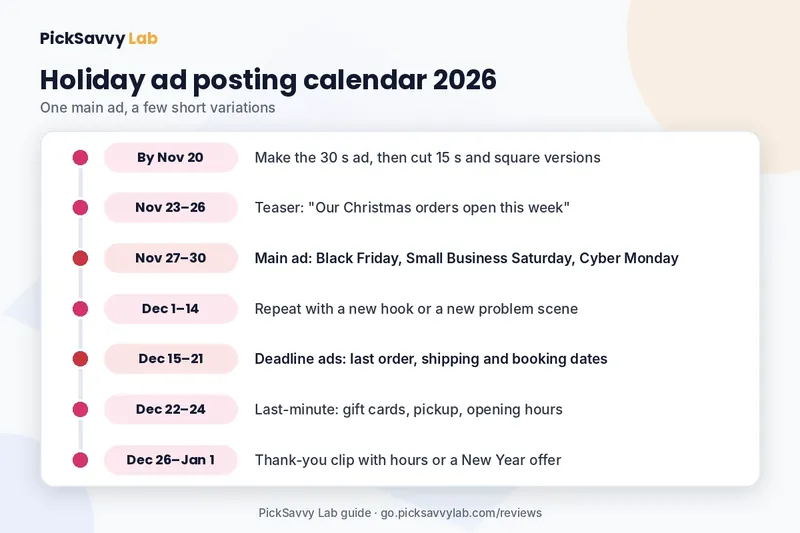
A Christmas ad posted on December 22 has two days to work. Here's a calendar for 2026 that spreads one main ad and a few short cuts across the season:
- By Nov 20 — make it. Finish the 30-second version and cut 15-second and square versions from it.
- Nov 23–26 — teaser. A 10 to 15 second clip: "Our Christmas menu / gift boxes / booking slots open this week."
- Nov 27–30 — the weekend deals period. Black Friday is Nov 27, Small Business Saturday Nov 28 and Cyber Monday Nov 30 in 2026. Post your main ad with your real offer. If you don't discount, say what you do offer instead ("handmade, local, wrapped for you").
- Dec 1–14 — repeat with variations. Swap the hook line or the character's problem and post again.
- Dec 15–21 — deadline ads. Last order dates, last shipping days, last booking slots. Real dates only.
- Dec 22–24 — last-minute ad. Gift cards, e-vouchers, same-day pickup, opening hours.
- Dec 26–Jan 1 — thank-you clip. A short "thank you, see you in the new year" scene with your hours or a New Year offer.
If you only have time for one ad, post it in the last week of November and pin it to your profile until the deadline passes.
Step 6: Check it before it goes live
Run through this quick list before you publish:
- The offer, price and date are true and match your website or shop sign, with no invented "was" price or countdown.
- Captions are on, and the offer is readable on a phone with the sound off.
- Music and characters are original or licensed for commercial use.
- The ad ends with one action: call, visit, book or order.
- If the platform asks whether content is AI-generated or altered, answer honestly.
FAQ
How long should a Christmas cartoon ad be? For Shorts and Reels, 15 to 30 seconds is a good target. For YouTube, a website or email, 30 to 60 seconds gives room for a full story. YouTube's help page says Shorts can be up to three minutes, but short ads are easier to finish and to watch.
Do I need animation skills? No. AI cartoon tools such as RocketToons generate scenes from your text, and drag-and-drop tools let you place ready-made characters. Either way, the script and the offer matter more than the animation.
When should I post my holiday ad? Ideally have it ready by about November 20, post a teaser before Thanksgiving week ends, run the main ad over Nov 27–30, then switch to deadline and last-minute versions in December.
Is RocketToons a one-time payment? Its sales page listed the Commercial plan at $37 one time with 1,000 credits (checked Nov 7, 2026). Optional upgrades are offered after checkout. Check the official page for the current price.
Next step
Write your one-line offer today, then fill in the 30-second template above. If you want AI to draw and voice the scenes, read our RocketToons review for the credits, styles and guarantee. If you're still choosing a cartoon tool, our comparison of a Toonly alternative with a one-time payment shows how a drag-and-drop editor and an AI studio differ. For every tool we cover, visit the PickSavvy Lab home page.
Sources: RocketToons sales page (checked Nov 7, 2026); YouTube Help: Understand three-minute YouTube Shorts (checked Nov 8, 2026). Product names belong to their owners. Results depend on your offer, your audience and your posting; nobody can promise sales from an ad, and we don't.
Free: grab our Holiday Content Kit → https://picksavvylabdigitaltools.systeme.io/holiday-kit
Free: Holiday Content Kit (email required, not an affiliate link)
Affiliate disclosure & privacy policy · About · Free Holiday Content Kit