Toonly Alternative Without a Monthly Fee? A Fair Look at RocketToons (2026)
This post contains affiliate links; I may earn a commission at no extra cost to you.
AI disclosure: this guide was drafted with help from AI writing tools and reviewed and edited by PickSavvy Lab. Product details come from each vendor's official pages.
If you're searching for a Toonly alternative with a one-time payment, you probably like the idea of cartoon explainer videos but don't want another monthly bill. This guide puts one option, RocketToons Commercial, next to Toonly using only what each company publishes about itself: Toonly's own website, the Voomly Help Center (Toonly's support site), and the RocketToons sales page. Toonly facts were checked on those pages on Nov 8, 2026.
Two things up front. First, we have not run a side-by-side test of both tools, so this is a comparison of stated features, prices and limits, not a performance verdict. Second, these tools work in very different ways, so "cheaper" isn't the whole story. By the end you should know which approach fits the videos you actually want to make.
The short answer
- Toonly is installed desktop software where you build each scene: pick a background, drag in characters and props, and animate them yourself. The Voomly Help Center lists monthly and yearly plans, each free for 14 days.
- RocketToons Commercial is a browser-based AI studio: you type an idea, review an AI-made storyboard, and spend credits to animate it. According to its sales page, it costs $37 one time for the Commercial plan.
- If you want full manual control over every movement, Toonly's approach is closer to what you want.
- If you want AI to do the drawing and animating, and you mostly make short clips, RocketToons is the one built for that, but you need to plan around its credits.
Two different ways to make a cartoon
How Toonly describes its workflow
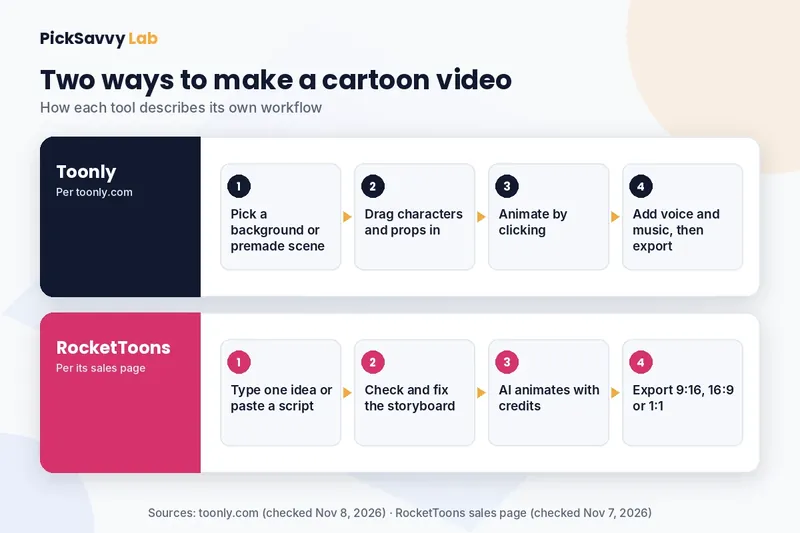
Toonly's website calls it "The Simplest Drag and Drop Explainer Video Creator." When we checked on November 8, 2026, the page described this process:
- Choose a background or one of the premade scenes (a background, characters and props already combined).
- Drag characters and props onto the scene.
- Animate them by clicking.
- Record a voiceover in the app or upload one, add music, and export.
The page lists "200 total character images" (10 characters with 20 poses each), 81 backgrounds and scenes, hundreds of props, and 20 royalty-free music tracks. It says the artwork was custom drawn by its own professional graphic design team, not stock images. Exports are offered at 480p, 720p or a custom size, at 24 to 60 fps, and the page says you can export unlimited videos. Toonly is listed as available for Mac and PC, as installed software.
The strength of this model is control. Every character, pose and timing choice is yours, and the style stays consistent because everything comes from one illustrated library.
How RocketToons describes its workflow
According to its sales page (checked November 7, 2026), RocketToons works in three stages:
- Type an idea. One sentence, or paste your own script. It writes the script and splits it into scenes.
- Check the storyboard. Each scene appears as a still with its voiced line. You can swap shots, edit lines, reorder or cut scenes, and regenerate only what you changed.
- Export and post. HD MP4 in 9:16, 16:9 or 1:1 with no watermark, with direct posting to YouTube, Instagram, Facebook and LinkedIn.
The sales page also lists a cast library that saves characters, places and props for reuse across episodes, 8 animation styles (including Pixar-style 3D, classic 2D, anime, claymation and comic book), 40 voices with lip-synced dialogue, voices and subtitles in 54 languages, 38 background tracks and auto captions in 2 styles. It runs in the browser on Mac or Windows and includes a commercial license.
The strength of this model is speed from idea to draft, plus a choice of looks. The trade-off is that the AI does the drawing and animating, so you direct rather than animate, and output can vary between generations.
Pricing side by side
This is the part most people searching for a Toonly alternative care about, so here are the numbers exactly as each company publishes them.
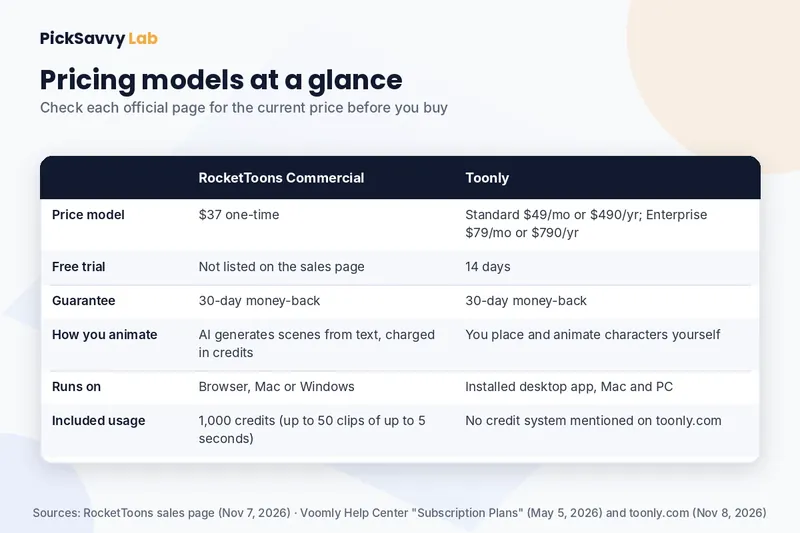
| Feature | RocketToons Commercial | Toonly |
|---|---|---|
| Price model | $37 one-time (sales page, Nov 7, 2026) | Standard $49/month or $490/year; Enterprise $79/month or $790/year (Voomly Help Center) |
| Free trial | Not listed on the sales page | 14 days |
| Money-back guarantee | 30 days | 30 days |
| How you animate | AI generates scenes from text, charged in credits | You place and animate characters yourself |
| Runs on | Browser, Mac or Windows | Installed desktop app, Mac and PC |
| Included usage | 1,000 credits (up to 50 short videos of up to 5 seconds each) | No credits mentioned; toonly.com says you can export unlimited videos |
A few notes so this stays fair:
- Toonly's plans include more than Toonly. The Voomly Help Center lists Toonly Standard together with Voomly Cloud, and Toonly Enterprise together with Voomly Pro. Toonly.com also says Toonly is now part of Voomly Cloud, which gives access to Standard versions of Doodly, Toonly, Talkia, People Builder, Pyks and Voomly. If you'd use those other apps, the subscription covers more than one tool.
- Check Toonly's own pricing page. Toonly.com says it has 2 pricing levels and links to a separate pricing page. Prices and offers can change, so check that page for what's available to you today (we checked on Nov 8, 2026).
- RocketToons also sells upgrades. Its sales page lists up to five optional upgrades after checkout (Elite, Pro, Studio, Agent and Reseller), and a Bundle that was listed at $317 on JVZoo on November 7, 2026. You don't need them to use the Commercial plan, but you should expect to see them.
The credit question (read this before you buy RocketToons)
"No monthly fee" doesn't mean "unlimited." RocketToons Commercial runs on credits. According to its sales page:
- 1,000 credits are included, which cover up to 50 short videos of up to 5 seconds each.
- Credits are charged by duration, and the cost shows before each generation.
- The page doesn't state a maximum episode length.
By our reading, that makes the base plan a better match for Shorts, short scenes and promo clips than for long episodes every day. Toonly's page doesn't mention credits; it says you can export unlimited videos, because you animate scenes yourself rather than generating them.
So the real comparison isn't only "$37 once vs a subscription." It's "a set amount of AI generation vs a tool you can use as much as you like while your plan is active." Count how many seconds of finished animation you need per month before deciding.
Who each one fits
Toonly is likely the better fit if you:
- Want frame-level control over characters, poses and timing.
- Like one consistent illustrated style for a whole channel or course.
- Prefer installed desktop software on Mac or PC.
- Want to try first with a free trial before paying.
- Would also use the other Voomly apps included in its plans.
RocketToons Commercial is likely the better fit if you:
- Want AI to draft the script, storyboard, voices and animation from one line.
- Make short vertical clips for YouTube Shorts, Reels or Facebook.
- Want several looks (3D, 2D, anime, claymation, comic book) without drawing.
- Need voices or subtitles in more than one language.
- Prefer a one-time price and accept a credit limit in exchange.
Skip RocketToons if you need long films every day on the base credits, want manual animation control, or expect views or income just from posting. The vendor promises neither, and we don't either.
Pros and cons of RocketToons as a Toonly alternative
In its favor (per the sales page)
- One-time $37 price for the Commercial plan, no monthly fee for this plan.
- Storyboard review before you spend credits on animation.
- Saved cast keeps recurring characters consistent across episodes.
- Nothing to install; commercial license; 30-day money-back guarantee.
The catches
- Credits limit how much you can animate on the base plan.
- AI output varies, so plan time for redoing scenes.
- Up to five optional upgrades are offered after checkout.
- The comparison table on the RocketToons page is the vendor's own, not an independent test.
For the full feature list, the credit details and the guarantee, see our RocketToons review.
Whichever tool you pick, do this first
The tool matters less than the plan. Before spending money or credits:
- Write your first episode as five short beats: who and where, what they want, the obstacle, the attempt, the payoff.
- Make a one-page character sheet so your character looks the same in every scene.
- Decide on one format (for example, 45-second vertical Shorts) and plan three episodes.
Our guide on how to make cartoon videos for YouTube walks through each of these steps with a worked example.
FAQ
Is there a Toonly alternative with a one-time payment? Yes. RocketToons Commercial is listed at $37 one time on its sales page (checked November 7, 2026), with 1,000 credits. The Voomly Help Center lists Toonly as monthly or yearly plans ($49/month or $490/year Standard; $79/month or $790/year Enterprise), as checked Nov 8, 2026. Check both official pages for current pricing.
Is RocketToons the same kind of tool as Toonly? No. Toonly is a drag-and-drop editor where you animate scenes yourself. RocketToons is an AI studio that generates the storyboard and animation from your text, using credits.
Does Toonly have a free trial? The Voomly Help Center lists both Toonly plans as free for 14 days (checked Nov 8, 2026). The RocketToons sales page doesn't list a free trial, but it offers a 30-day money-back guarantee.
Can I use either one for client work? The RocketToons sales page says the Commercial plan includes a commercial license. For Toonly, check its official pricing page for the license terms of each plan.
Which is better for YouTube Shorts? RocketToons exports 9:16 directly and its credits suit short clips, per its sales page. Toonly lists export sizes of 480p, 720p and custom, so check its current export options for vertical video before you commit.
Next step
If a one-time price and AI-generated scenes sound right for you, read our full RocketToons review for the credit details, upgrades and the guarantee. If you'd rather animate by hand, check Toonly's official pages for its current plans and trial. For all the tools we cover, see the PickSavvy Lab home page.
Sources: RocketToons sales page (checked Nov 7, 2026); Voomly Help Center: Subscription Plans (updated May 2026, checked Nov 8, 2026); toonly.com (checked Nov 8, 2026). Product names belong to their owners. PickSavvy Lab is not affiliated with Toonly or Voomly.
Free: grab our Holiday Content Kit → https://picksavvylabdigitaltools.systeme.io/holiday-kit
Free: Holiday Content Kit (email required, not an affiliate link)
Affiliate disclosure & privacy policy · About · Free Holiday Content Kit