Explaindio vs Doodly (2026): Which Explainer Video Software Fits Beginners?
This post contains affiliate links; I may earn a commission at no extra cost to you.
AI disclosure: this guide was drafted with help from AI writing tools and reviewed and edited by PickSavvy Lab. Product details come from each vendor's official pages.
Explaindio vs Doodly is a common question for beginners because both make animated explainer videos without filming. But they're built for different jobs. Doodly focuses on hand-drawn whiteboard-style animation. Explaindio 5 AI pairs an animation studio with a system for finding local businesses and pitching them a sample video.
This comparison uses only what each company publishes: the Explaindio 5 AI sales page, and Doodly's own website and the Voomly Help Center (Doodly's support site). Doodly facts were checked on those pages on Nov 8, 2026. We haven't run a side-by-side test of both, so treat this as a guide to stated features, prices and limits, not a performance ranking. Our goal is to help you match the tool to the videos you need.
Explaindio vs Doodly at a glance
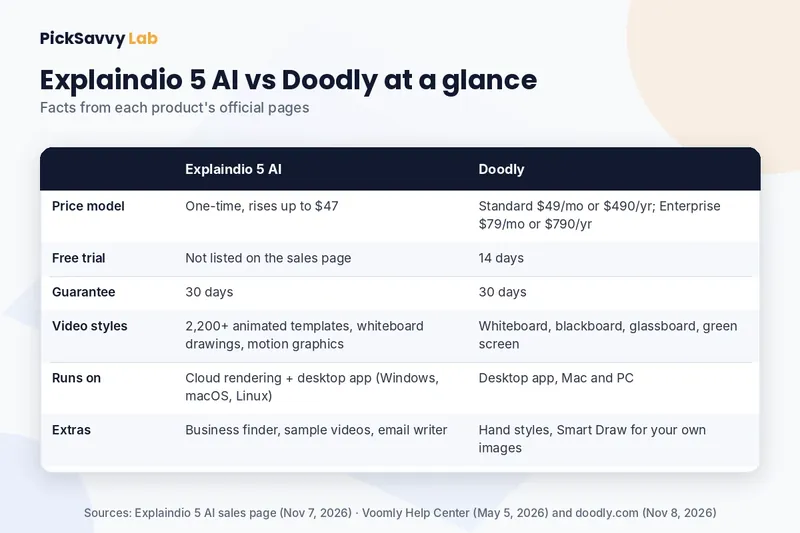
| Feature | Explaindio 5 AI | Doodly |
|---|---|---|
| Price model | One-time payment; the sales page says the price rises as more people buy, up to $47 | Standard $49/month or $490/year; Enterprise $79/month or $790/year (Voomly Help Center) |
| Free trial | Not listed on the sales page | 14 days |
| Money-back guarantee | 30 days | 30 days |
| Video styles | 2,200+ animated templates, five Video Blueprints, whiteboard drawings, moving text, motion graphics | Whiteboard, blackboard, glassboard and green screen animation |
| Runs on | Cloud rendering, plus a desktop app for Windows 10+, macOS 13+ and 64-bit Linux | Installed software for Mac and PC |
| Extras | Business finder, one-click sample videos, outreach email writer | Hand styles, Smart Draw for your own images, in-app voice recording |
| Included usage | 800 credits (about 60 sample videos) | No credits mentioned; doodly.com says you can create unlimited whiteboard videos |
Sources: Explaindio 5 AI sales page (checked Nov 7, 2026); doodly.com and the Voomly Help Center (checked Nov 8, 2026).
What Doodly is built for
Doodly's website calls it "The Simplest Animation Whiteboard Software." When we checked on November 8, 2026, it described these features:
- Four board styles: whiteboard, blackboard, glassboard and green screen.
- A pre-drawn library: custom-drawn doodle images (not stock), which the page describes as 200 characters with 20 poses each, 20 background scenes, and hundreds of props and assets.
- Your own images: upload images and have them drawn on screen with what Doodly calls Smart Draw.
- Drawing hands: tens of male and female hand types, in various colors, sizes and ethnicities.
- Audio: record a voiceover inside Doodly or upload one, and drag royalty-free music tracks onto the timeline.
- Export: from 480p up to 1080p or a custom size, at 24 to 60 frames per second.
- Platform: listed as available for Mac and PC, as software you install.
The site also says Doodly is included with Voomly Cloud, a suite that includes other content creation tools such as Toonly, Talkia, Pyks and People Builder. The Voomly Help Center lists the Doodly plans as Standard (with Voomly Cloud) and Enterprise (with Voomly Pro), each with a 14-day free trial. Doodly.com says it has 2 pricing levels and links to a separate pricing page. Prices and offers can change, so check that page for what applies today (we checked on Nov 8, 2026).
In short: if the "hand drawing on a whiteboard" look is what you want, Doodly is designed around exactly that.
What Explaindio 5 AI is built for
According to the Explaindio 5 AI sales page (checked November 7, 2026), it combines a business finder with the Explaindio animation studio:
- Business finder and website scan. Search by business type and town, up to 50 businesses per search. The scan flags sites with no video and notes issues such as no security certificate or not mobile-friendly.
- One-click sample videos. It builds a sample explainer from a business's own website and shows it on a watermarked page with no download.
- Email writer and outreach log. It drafts the outreach email and logs replies. You read and send each email yourself; it doesn't send emails for you.
- Full Explaindio studio. More than 2,200 animated templates, five Video Blueprints, whiteboard drawings, moving text and motion graphics, with free stock photos and videos in the editor.
- Rendering. Renders in the cloud, or free locally in the included desktop app for Windows 10+, macOS 13 Ventura+ and 64-bit Linux. The interface is available in six languages.
In short: Explaindio 5 AI is aimed at people who want to make explainer videos for local businesses, with a structured way to show an owner what their video could look like.
Price: one-time vs subscription
This is the clearest difference.
- Explaindio 5 AI is a one-time payment. The sales page says the price rises as more people buy, up to $47, and the checkout shows the exact price. It includes 800 credits (about 60 sample videos), a commercial license and the desktop app. Optional upgrades are offered after checkout, including Explaindio 5 Pro (which also has a Pro Monthly option), Fix-It Pack, Agency, Done-For-You Leads and a Bundle.
- Doodly plans are listed in the Voomly Help Center at $49 a month or $490 a year (Standard, with Voomly Cloud), or $79 a month or $790 a year (Enterprise, with Voomly Pro). Each plan also includes access to other Voomly apps, which adds value if you'd use them.
A one-time price is easier to budget. A subscription with a free trial lets you test before paying. Neither is automatically better; it depends on how long you'll use the tool and whether you'd use the extra apps.
Which one should a beginner pick?
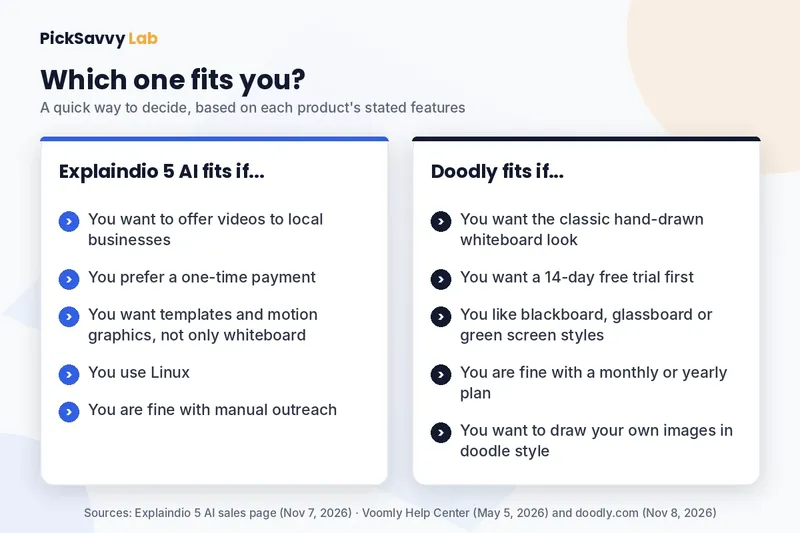
Explaindio 5 AI is likely the better fit if you:
- Want to offer explainer videos to local businesses as a freelancer or small agency.
- Prefer a one-time payment over a monthly plan.
- Want templates and motion graphics, not only whiteboard drawings.
- Work on Linux, or want free local rendering in a desktop app.
- Are comfortable doing your own outreach, one email at a time.
Doodly is likely the better fit if you:
- Want the classic hand-drawn whiteboard look, or blackboard and glassboard variations.
- Want a 14-day free trial before paying.
- Want to upload your own images and have them drawn in doodle style.
- Would also use other Voomly apps included in the plans.
- Are fine with a monthly or yearly plan.
Honest catches on both sides
Explaindio 5 AI (per its sales page)
- You read and send every outreach email yourself; nothing is sent automatically.
- 800 credits cover about 60 sample videos; more needs credit packs or the Pro upgrade.
- One-click samples are narrated in English only, with four US English voices.
- A thin website gives a thinner sample, and businesses with no website can't get one.
- Search results depend on free map data, which varies by location.
- The vendor makes no promise of clients or income, and we don't either.
Doodly (per its official pages)
- Pricing on the help center is a subscription, so the cost continues while you use it.
- It's installed desktop software for Mac and PC; the site doesn't mention a browser version or Linux.
- Its library and look are built around the doodle style, which suits some brands more than others.
For the full Explaindio feature list, upgrades and the guarantee, see our Explaindio 5 AI review.
Before you buy either: plan one video on paper
Whichever tool you choose, beginners get better results by planning before opening any software:
- Write one line: who the video is for, and the one question it answers.
- Write a script of about 130 to 150 words for a 60-second video.
- Turn each sentence into one scene, and choose one visual style for all of them.
Our guide on how to make an explainer video without experience covers all seven steps, from script to export.
FAQ
Is Explaindio or Doodly better for beginners? It depends on the goal. Doodly is built around whiteboard-style animation and offers a 14-day free trial. Explaindio 5 AI adds a business finder and sample videos for pitching local businesses, for a one-time price. Pick the one whose main feature matches the videos you need.
Is Explaindio a one-time payment? According to its sales page (checked November 7, 2026), Explaindio 5 AI is a one-time payment that rises as more people buy, up to $47. Optional upgrades are offered after checkout, one of which has a monthly option.
How much does Doodly cost? The Voomly Help Center lists Doodly Standard at $49 a month or $490 a year, and Enterprise at $79 a month or $790 a year, each with a 14-day free trial. As checked Nov 8, 2026; prices can change, so check the official pricing page.
Can Explaindio make whiteboard videos? Yes. Its sales page lists whiteboard drawings alongside animated templates, moving text and motion graphics.
Do both offer a money-back guarantee? Yes. Both list a 30-day money-back guarantee on their official pages.
Next step
If pitching explainer videos to local businesses is your plan, read our full Explaindio 5 AI review for the credits, upgrades and refund terms. If you mainly want whiteboard animation, Doodly's official site lists its current plans and trial. For all the tools we cover, see the PickSavvy Lab home page.
Sources: Explaindio 5 AI sales page (checked Nov 7, 2026); doodly.com (checked Nov 8, 2026); Voomly Help Center: Subscription Plans (updated May 2026, checked Nov 8, 2026). Product names belong to their owners. PickSavvy Lab is not affiliated with Doodly or Voomly.
Free: grab our Holiday Content Kit → https://picksavvylabdigitaltools.systeme.io/holiday-kit
Free: Holiday Content Kit (email required, not an affiliate link)
Affiliate disclosure & privacy policy · About · Free Holiday Content Kit